Adding Unsubscribe Link in Email Footer
Published: Updated:
An unsubscribe link is essential for complying with regulations like the CAN-SPAM Act and GDPR, which require businesses to include clear unsubscribe options in their marketing emails. Adding a visible and functional unsubscribe link can also improve customer trust and reduce spam complaints. In this article, you will learn how to add and customize an unsubscribe link in emails.
Requirements
Section titled “Requirements”-
An active ClickFunnels account
-
Access to Email Settings (available only to users with the Funnel Builder, Marketing, or Administrator roles)
How to Add an Unsubscribe Link in Emails
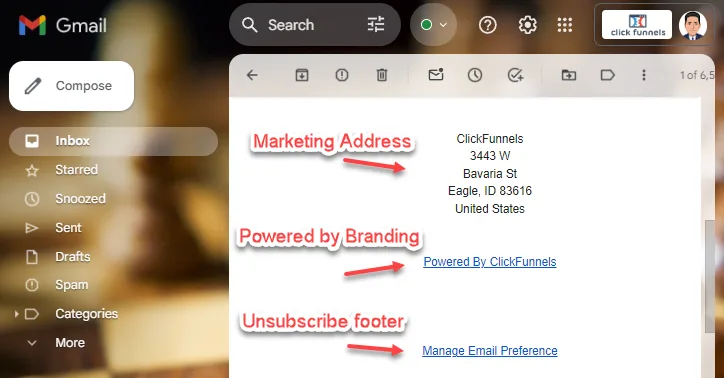
Section titled “How to Add an Unsubscribe Link in Emails”For all marketing emails sent through ClickFunnels, such as broadcasts and workflow emails, ClickFunnels will automatically add an unsubscribe link to the bottom of the email. This link allows recipients to unsubscribe from specific topics or all future emails by directing them to a dedicated unsubscribe page.
However, ClickFunnels offers the flexibility to customize the text of this unsubscribe link. Instead of the default text “Unsubscribe”, you can modify it to something more personalized, such as “Manage Email Preferences,” providing a more user-friendly experience.
Customizing Email Footer in Email Settings
Section titled “Customizing Email Footer in Email Settings”-
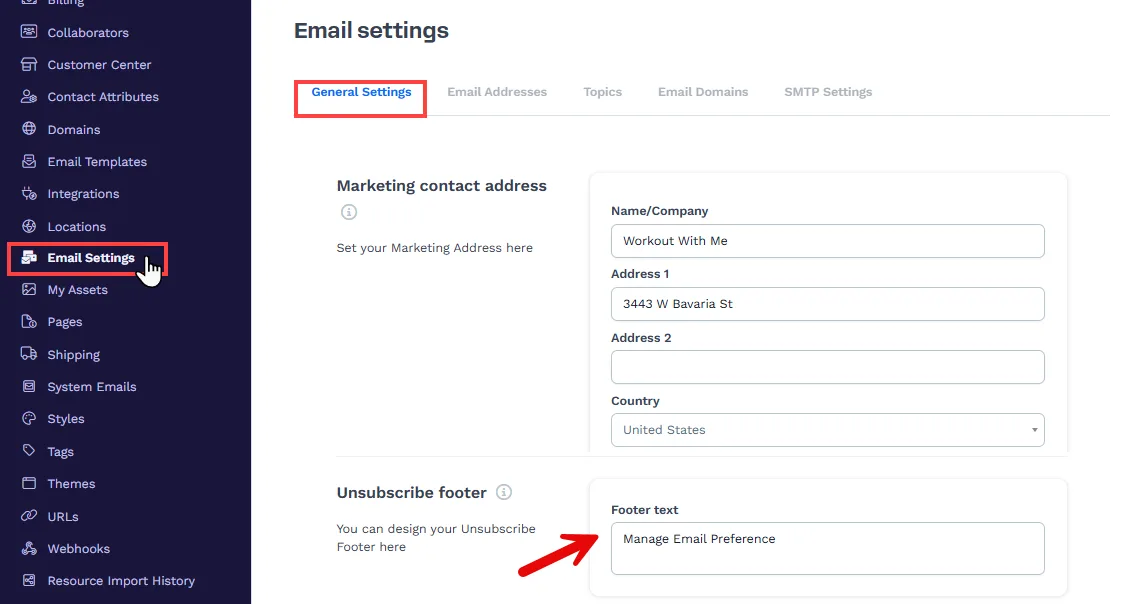
From your ClickFunnels dashboard, go to Workspace Settings.
-
Click on Email Settings, and then select the General Settings tab.
-
Scroll down to find the Unsubscribe Footer section.
-
In the Footer Text field, you can add custom text that will automatically appear in the footer of your email. For example,
Manage Email Preferencesto provide more personalized options for your audience. This text will be hyperlinked to the unsubscribe page, allowing your recipients to manage their subscription preferences. If left blank, the default textUnsubscribewill be used. When clicked, users will be redirected to the unsubscribe page where they can update their preferences or opt out of future emails.