
Restricted Domain Names
Published: Updated:
When connecting a domain to your ClickFunnels workspace, certain names are restricted due to trademark protections or internal use. If your domain includes one of these restricted terms, you will see an error message preventing you from proceeding.
Why Some Domains Are Restricted
Section titled “Why Some Domains Are Restricted”To ensure compliance with legal requirements and protect trademarked terms, ClickFunnels restricts domains that contain:
-
Trademarked phrases such as “ClickFunnels”
-
Brand references to ClickFunnels or other protected brands
-
Internally reserved terms used by ClickFunnels for system configuration or product features
This is done to avoid legal conflicts and maintain platform integrity.
Example:
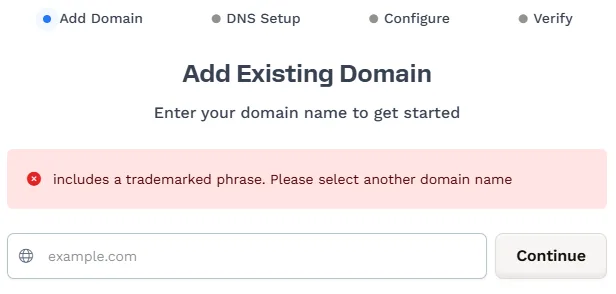
If you attempt to connect a domain like clickfunnelshelp.com, you’ll receive an error message:
“includes a trademarked phrase. Please select another domain name”
This message means that your domain includes a trademark phrase that is protected or reserved, and you must choose a different name to continue.
Restricted Domain Names
Section titled “Restricted Domain Names”The following domain names (and variations of them) are restricted from being connected to your ClickFunnels workspace due to trademark protections or internal platform usage.
| Restricted Term | Restricted Term |
|---|---|
| 1funnelaway | Onefunnelaway |
| 2commaclub | PayPal |
| Airbnb | Perfect Webinar |
| Amazon | |
| Android | Russell Brunson |
| Anytimefitness | Scentsy |
| ASOS | Snapchat |
| Clickbank | TikTok |
| ClickFunnels | |
| ClickFunnel | Twocommaclub |
| DotComSecrets | Upwork |
| Ebay | Vector Magic |
| Expert Secrets | |
| YouTube | |
| Funnel Hack-A-Thon | |
| Funnel Hacking | Marketingsecrets |
| Nike | |
| Herbalife | |
| iPhone | JLL |
What to Do If Your Domain Is Restricted
Section titled “What to Do If Your Domain Is Restricted”If your domain is flagged:
-
Review the domain name for any references to ClickFunnels or other well-known brands.
-
Remove the restricted term from your domain name.
-
Try a different domain that doesn’t include trademarked or reserved words.
Restricted Domain Names FAQs
Section titled “Restricted Domain Names FAQs”Can I use “ClickFunnels” in my domain as an affiliate?
No. Even as an affiliate, you are not permitted to use “ClickFunnels” or any variation of it in your domain name. This violates trademark policy.
How can I check if my domain is allowed before purchasing it?
To avoid purchasing a restricted domain, you can test the domain name by attempting to add it to your ClickFunnels workspace before completing your purchase. If the domain is restricted, you’ll immediately see an error message. Alternatively, you can contact ClickFunnels Support for help verifying the domain in advance.
What if I legally own the trademark for a restricted domain name?
If you own the rights to a domain name that is currently restricted, we recommend contacting ClickFunnels Support for assistance. Our team can review your request and provide guidance based on your case.