
How to Publish and Share Your Funnel URL
Published: Updated:
Publishing and sharing your funnel URL is essential for making your funnel accessible to your audience. This article will walk you through the steps to publishing and finding the URL for sharing. By following these steps, you can easily distribute your funnel and ensure it reaches your target audience effectively.
Requirements
Section titled “Requirements”-
An active ClickFunnels account
Accessing Funnel Settings and Enabling Live Mode
Section titled “Accessing Funnel Settings and Enabling Live Mode”-
Locate the funnel you want to publish.
-
Click the Settings button at the top-right corner of the funnel workflow page to open the funnel’s settings.
-
Set your funnel to live mode. For detailed instructions, refer to this article on how to set your funnel to live mode.
How to Copy and Publish Your Funnel URL
Section titled “How to Copy and Publish Your Funnel URL”-
Click on Funnels from the left navigation menu.
-
Click on the funnel you wish to publish to open the Funnel Workflow Editor.
-
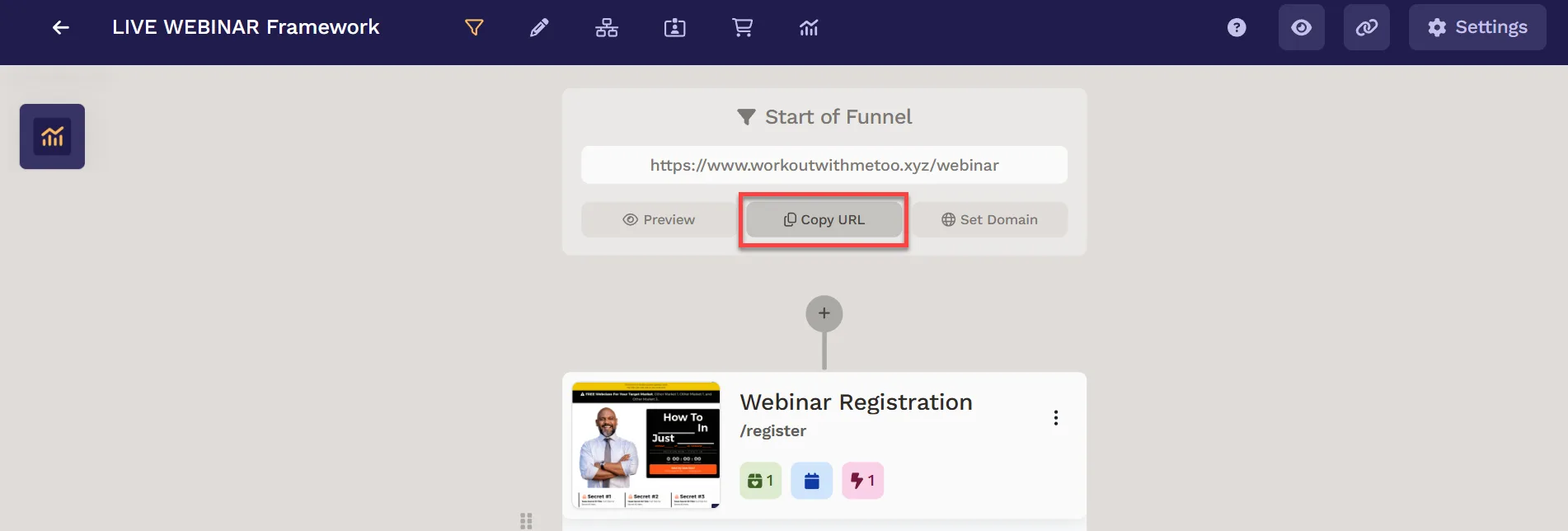
Click Copy URL at the top of the funnel builder to copy the link to your clipboard.
-
Share the copied URL on your social media and marketing platforms.
Checklist Before Publishing Your Funnel
Section titled “Checklist Before Publishing Your Funnel”-
Select the correct domain: Ensure the correct domain is selected in funnel settings. For details, refer to the article on how to connect a domain.
-
Verify page order: Check that pages are in the correct order and remove or reposition extra steps.
-
Customize URLs: Customize the funnel URL path and page paths. Refer to the article on Page URL Path
-
Test on devices: Check the funnel on different devices and browsers to ensure the URL is accessible and working correctly for your audience.
-
Test Action Elements Verify that all links, buttons, and features within the funnel are functioning as expected.
-
Connect products: If you’re selling products, ensure they are connected to the order form with the correct price. See the article on adding products.
-
Optimize for SEO: Update page titles, descriptions, and images for SEO. Learn about SEO optimization in these articles:
-
Connect workflows: Attach and customize appropriate workflows to funnel steps when applicable. Refer to the article on Getting Started With Workflows
-
Verify split tests: If applicable, ensure split test distribution is correct. Read about creating split tests