Affiliate Center - How to Make Products Commissionable
Published: Updated:
In the Affiliate Center app within ClickFunnels, making products commissionable is crucial for enabling affiliates to promote them and earn commissions. Products play a central role in your affiliate marketing strategy, as they are the core items that affiliates will promote to drive sales. In this article, you will learn how to turn on commission for your products, manage product-specific commission settings, and override commission plans.
Requirements
Section titled “Requirements”-
An active ClickFunnels account
-
Available on the Optimize and Dominate plan
How to Turn On Commission in a Product
Section titled “How to Turn On Commission in a Product”By default, any new product created in ClickFunnels is set to be commissionable. However, if you have an existing product that does not have the commission option turned on, you can enable it on the product’s Sales channels tab. Here’s how you can do that:
-
Create a Product in ClickFunnels:
-
From the left side of the navigation, click Products and then All Products menu.
-
Click Create Product. In the Create Product dialog, choose what you’re selling (Digital or Physical), enter the Product name, choose how customers will pay and enter the price, then click Create Product.
For a more comprehensive guide on creating a product, refer to our How to Create and Manage a Product article.
-
-
Enable Commission for the Product:
-
In the product editor, open the Sales channels tab and scroll down to the Affiliates card. This card appears only when the Affiliate Center app is installed in your workspace.
-
Turn on the Commissionable switch. This ensures that affiliates can promote this product and earn commissions. The change saves as soon as you flip the switch. If you turn it off, this product will never generate affiliate commissions.
-
-
Override Commission Plans for Specific Products:
-
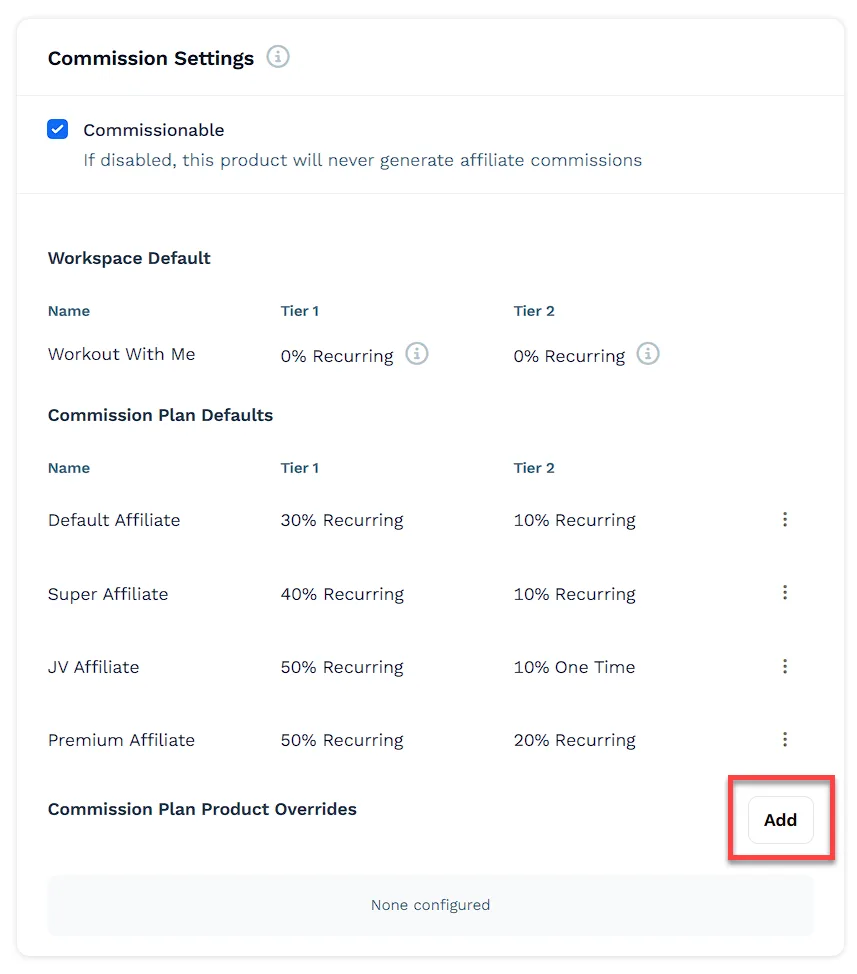
In the Affiliates card on the Sales channels tab, you can override the default commission plan for a specific product.
-
Click Add under Commission Plan Product Overrides and select the desired commission plan.
-
Select the Commission Plan from the dropdown menu.
-
Enter the Tier 1 commission amount. Use the dropdown to choose between % or USD.
-
Choose the Event Type, either Recurring or One Time.
-
(Optional) Enter the Tier 2 commission amount, if applicable.
-
Click Create to save the override.
-
Viewing Commissionable Products in the Affiliate Center
Section titled “Viewing Commissionable Products in the Affiliate Center”Once a product is set as commissionable, it will automatically appear in the Commissionable Products section of the Affiliate Center app.
-
Go to the Affiliate Center app in your ClickFunnels dashboard.
-
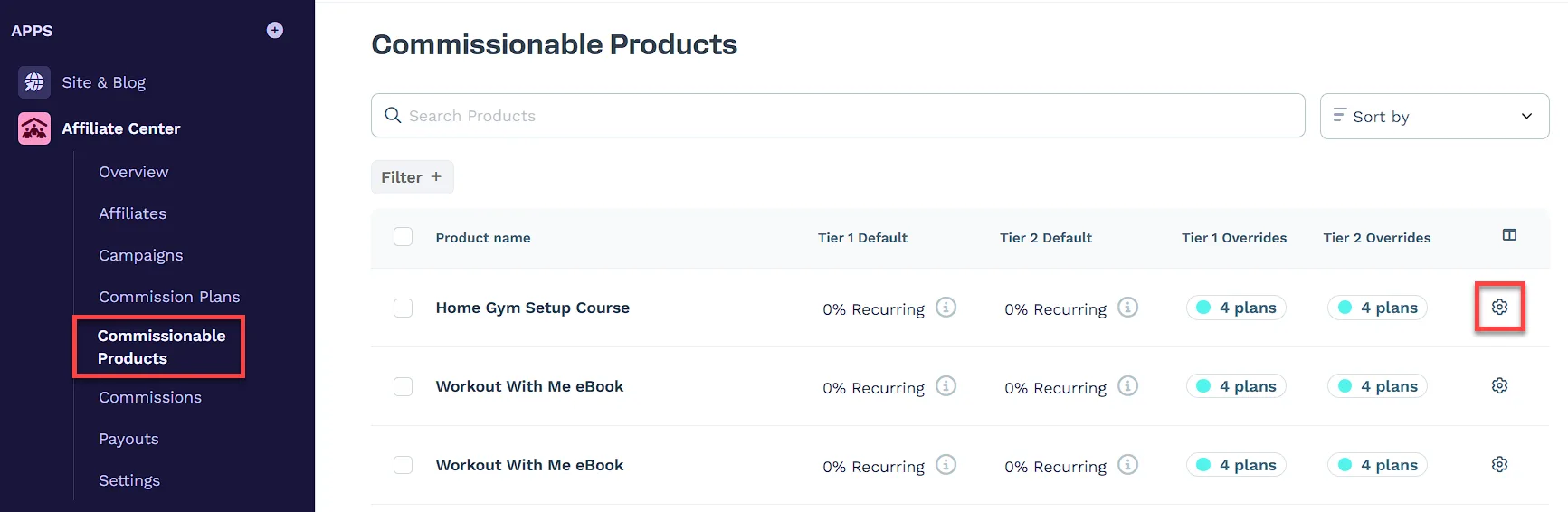
Click on Commissionable Products to view a list of all products that are enabled for commissions. You can also directly set specific overrides for each product regarding commission plans from this page.
-
Click on the product’s name or adjacent gear (⚙️) icon to edit its commission settings and apply overrides as needed for each affiliate commission plan.