
MessageHub Integrations: Dashboard Apps
Published: Updated:
This article will review the Dashboard Apps Integration inside of the Chat Settings. Dashboard Apps allows you to embed other applications inside the MessageHub dashboard to provide the context for customer support agents. This feature allows you to create an application independently and embed it inside the dashboard to provide user information, orders, or previous payment history. When you embed your application using the dashboard in MessageHub, your application will appear as a new tab next to the customer’s conversation.

Requirements
Section titled “Requirements”-
An active ClickFunnels account
-
The MessageHub App
Adding a Dashboard App
Section titled “Adding a Dashboard App”-
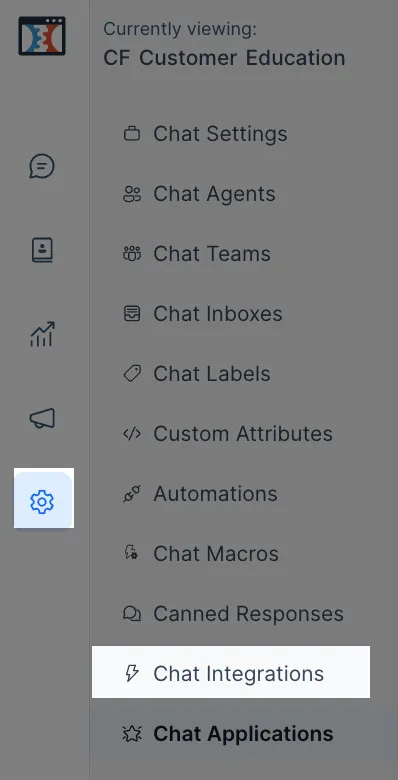
Click on the gear icon to open Chat Settings, then Chat Integrations.
-
Click on Configure next to Dashboard Apps.

-
Click on Add a New Dashboard App.
-
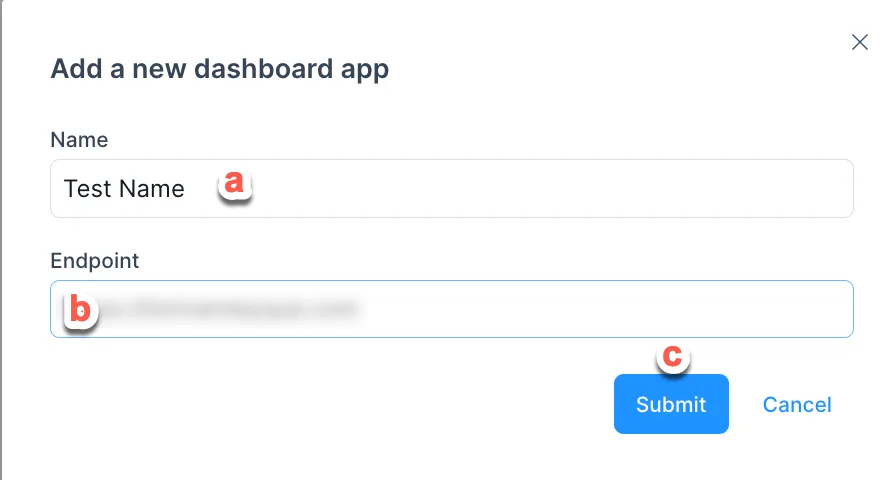
Complete the following information:
-
Add a Name for your Dashboard App.
-
Paste the Endpoint URL of your App.
-
Click on Submit when finished.
-
Receiving Data from MessageHub into Your App
Section titled “Receiving Data from MessageHub into Your App”MessageHub will send you the conversation context and the contact as a window event. You can listen to it in your app as described below.
window.addEventListener("message", function (event) {  if (!isJSONValid(event.data)) {    return;  }
  const eventData = JSON.parse(event.data);});
Event Payload
Section titled “Event Payload”conversation Objects
Section titled “conversation Objects”{ "meta": { "sender": { "additional_attributes": { "description": "string", "company_name": "string", "social_profiles": { "github": "string", "twitter": "string", "facebook": "string", "linkedin": "string" } }, "availability_status": "string", "email": "string", "id": "integer", "name": "string", "phone_number": "string", "identifier": "string", "thumbnail": "string", "custom_attributes": "object", "last_activity_at": "integer" }, "channel": "string", "assignee": { "id": "integer", "account_id": "integer", "availability_status": "string", "auto_offline": "boolean", "confirmed": "boolean", "email": "string", "available_name": "string", "name": "string", "role": "string", "thumbnail": "string" }, "hmac_verified": "boolean" }, "id": "integer", "messages": [ { "id": "integer", "content": "Hello", "inbox_id": "integer", "conversation_id": "integer", "message_type": "integer", "content_type": "string", "content_attributes": {}, "created_at": "integer", "private": "boolean", "source_id": "string", "sender": { "additional_attributes": { "description": "string", "company_name": "string", "social_profiles": { "github": "string", "twitter": "string", "facebook": "string", "linkedin": "string" } }, "custom_attributes": "object", "email": "string", "id": "integer", "identifier": "string", "name": "string", "phone_number": "string", "thumbnail": "string", "type": "string" } } ], "account_id": "integer", "additional_attributes": { "browser": { "device_name": "string", "browser_name": "string", "platform_name": "string", "browser_version": "string", "platform_version": "string" }, "referer": "string", "initiated_at": { "timestamp": "string" } }, "agent_last_seen_at": "integer", "assignee_last_seen_at": "integer", "can_reply": "boolean", "contact_last_seen_at": "integer", "custom_attributes": "object", "inbox_id": "integer", "labels": "array", "muted": "boolean", "snoozed_until": null, "status": "string", "timestamp": "integer", "unread_count": "integer", "allMessagesLoaded": "boolean", "dataFetched": "boolean"}contact Objects
Section titled “contact Objects”{ "additional_attributes": { "description": "string", "company_name": "string", "social_profiles": { "github": "string", "twitter": "string", "facebook": "string", "linkedin": "string" } }, "availability_status": "string", "email": "string", "id": "integer", "name": "string", "phone_number": "+91 9000000001", "identifier": "string || null", "thumbnail": "+91 9000000001", "custom_attributes": {}, "last_activity_at": "integer"}currentAgent Objects
Section titled “currentAgent Objects”{ "email": "string", "id": "integer", "name": "string"}The Final Payload
Section titled “The Final Payload”{ "event": "appContext", "data": { "conversation": { // <...conversation Object Attributes> }, "contact": { // <...contact Object Attributes> }, "currentAgent": { // <...currentAgent Object Attributes> } }}