
Utilizing a Single Domain for Multiple Funnels
Published: Updated:
Imagine you’re a fitness coach with various online funnels for your business: a webinar funnel for weekly fitness webinars, a sales funnel for your fitness merchandise, a course funnel for your online fitness programs, and an opt-in funnel for gathering leads through free workout guides. Each funnel is designed to attract and engage potential clients in different ways. In ClickFunnels, you can connect your domain to multiple funnels, so you don’t have to get new domains for each one. You can effectively manage your marketing efforts by strategically assigning paths for each funnel. This article will guide you through the process of using a single domain for multiple funnels.
Requirements
Section titled “Requirements”-
An active ClickFunnels account
-
At least two funnels created in the workspace
-
A domain connected to the workspace
How to Connect a Domain to Multiple Funnels
Section titled “How to Connect a Domain to Multiple Funnels”-
Click on the Funnels menu from the navigation on the left side.
-
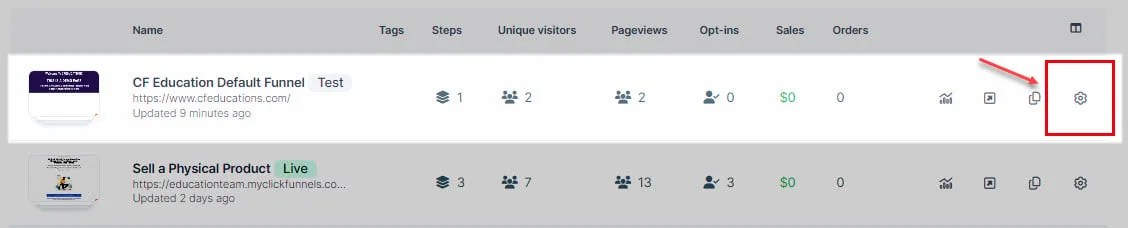
Identify a funnel you wish to associate with your domain and click the Gear ⚙️ icon to access the funnel’s settings.
-
In the Domain field, select the desired domain from the dropdown menu.
-
Enter the desired path in the Funnel Path URL field, such as
/webinar,/blog, or/about.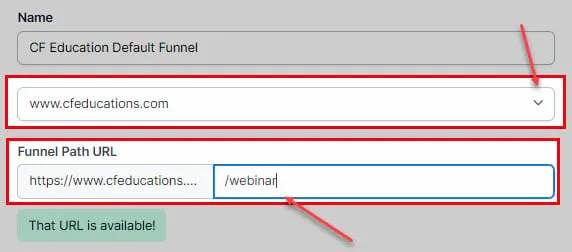
-
Alternatively, open the funnel and click the gear ⚙️ icon in the top-right corner of the funnel editor to open its Settings, then follow steps 3 and 4 there.

-
Click Update Funnel to save changes.
-
Repeat these steps for each additional funnel you wish to connect to the same domain.
Congratulations! You now know how to utilize a single domain for multiple funnels.