
How to Use Audit Logs in MessageHub
Published: Updated:
Audit Logs in MessageHub help you monitor and review key actions taken across your account. They record activities such as user logins, inbox updates, and automation changes, ensuring you have a detailed history for reference. In this article, you’ll learn how to access and use Audit Logs in MessageHub and the various activities they track.
Requirements:
Section titled “Requirements:”-
An active ClickFunnels account
-
The MessageHub App
Using Audit Logs in MessageHub
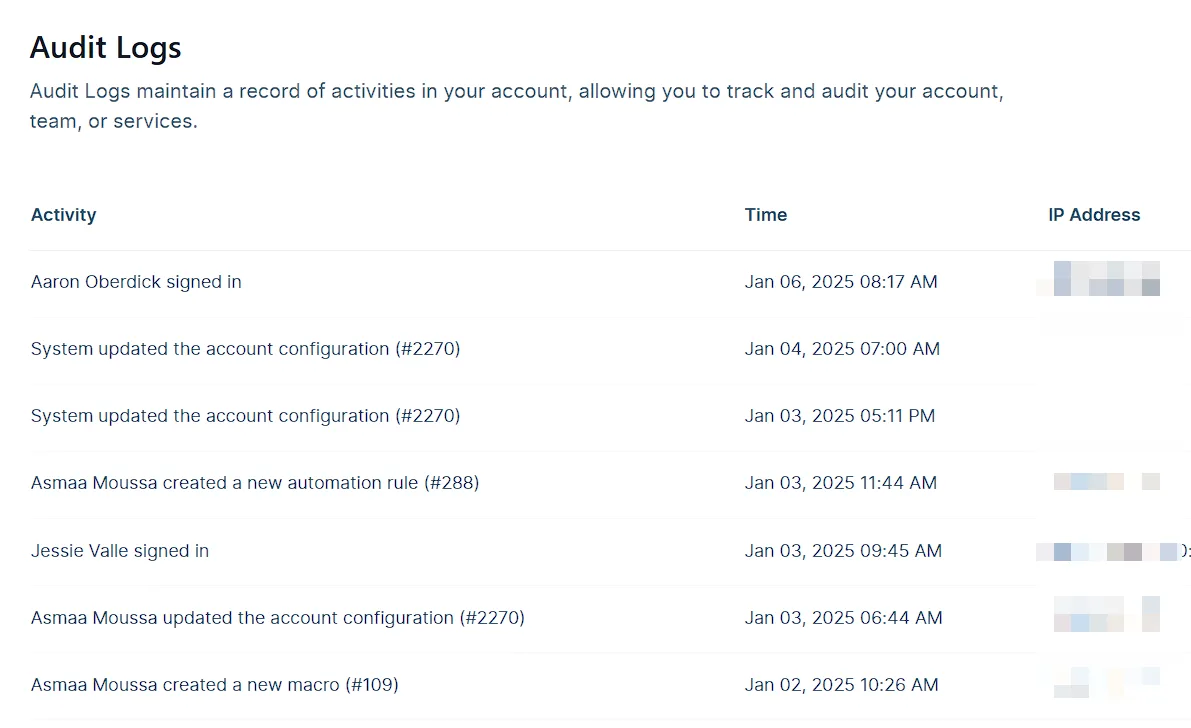
Section titled “Using Audit Logs in MessageHub”Audit Logs in MessageHub provide a detailed record of activities within your account. They track actions like user sign-ins, inbox updates, and changes to automation rules, along with timestamps and IP addresses.
To access the Audit Logs:
-
-
Navigate to the MessageHub app in the left-side menu in your ClickFunnels Workspace.
-
Go to Chat Settings ⚙ > Audit Logs in your MessageHub dashboard.
-
Once inside, you’ll see a detailed log organized by Activity, Time, and IP Address. Use the search bar or Cmd/Ctrl + F to locate specific entries quickly.
Activities Tracked Through Audit Logs
Section titled “Activities Tracked Through Audit Logs”Audit Logs in MessageHub record a wide range of activities to provide a detailed overview of account actions. Each activity entry includes the responsible user’s name, the action performed, a timestamp, and the associated IP address to help you trace actions effectively. Here are the categories of activities you can monitor:
User Activity Logs
Section titled “User Activity Logs”-
User sign-ins and sign-outs.
-
Changes to a user’s availability status (e.g., online, offline, busy).
-
Invitations sent to new users as agents or admins.
-
Role changes for users (e.g., agent to admin).
Account Activity Logs
Section titled “Account Activity Logs”- Updates to the account configuration.
Automation Rule Logs
Section titled “Automation Rule Logs”-
Creation of new automation rules.
-
Updates or deletion of existing automation rules.
Inbox Logs
Section titled “Inbox Logs”-
Creation, updates, or deletion of inboxes.
-
Addition or removal of team members from inboxes.
Webhook Logs
Section titled “Webhook Logs”- Updates or deletions of webhooks.
Team Logs
Section titled “Team Logs”-
Creation, updates, or deletion of teams.
-
Addition or removal of team members.